eProcureAI / Platform / Purchasing and POs
Purchasing and Purchase OrdersRaising a purchase request
takes about two minutes
Four short steps, then submit. A person approves. Spend commits then. Procurement goes to vendors for quotes. The purchase order is built from the quote you award.
This is the real screen. Every field above comes straight out of the product.
Easy enough that people stop asking finance for help
Ask anyone who has rolled out procurement software what decided it, and you tend to get the same answer. People used it because it was quick.
So that is what we built for. A requester opens one form. They give it a title, pick their department, say where it should go and when they need it. Six fields, and most of them remember themselves after the first time.
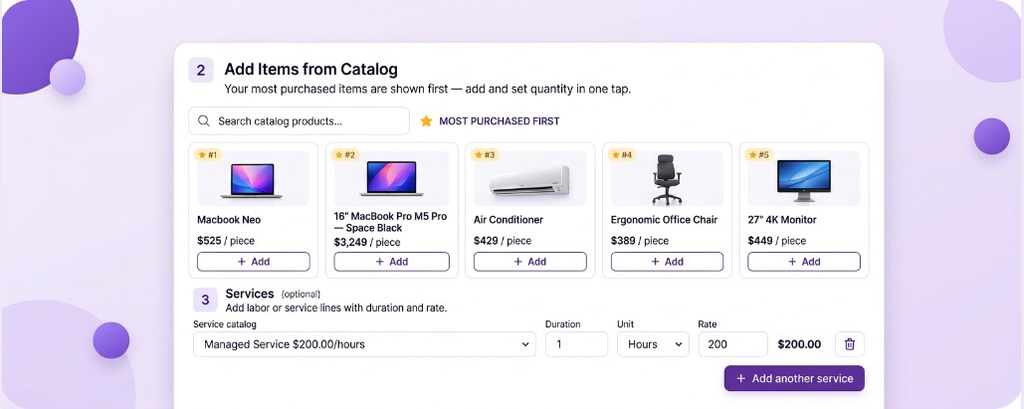
Step two is the catalog, so nobody has to describe what they want or dig out last year's price. They pick the laptop, or they pick a service like IT setup at eighty five dollars an hour, and the line total appears on its own. Step three shows the charge code with the money still available on it, on screen, before anyone has committed to anything. Step four is where supporting documents and an SOW template go on the request.
Then they press submit and go back to their actual job. The routing rules work out who approves it and in what order, based on the department and the amount. Approvers get the whole picture in one screen and can sign off from a phone.
What happens after the last approval
When the last approver signs, the request is fully approved and the committed amount is calculated. That is the budget commitment
Next, procurement is created and sent to vendors for quotes RFQ, RFP or reverse auction on the same record. After quotes are in and a person awards, the purchase order is built from that quote. Catalog items with terms already in place can go straight to a purchase order instead.
We cut our average PO cycle from eight days to under four hours. Our AP team went from chasing approvals all day to doing actual strategic work.Karen M., VP Finance, manufacturing, four plants, Texas
What a requester actually fills in
Request Information
Title, department, who is asking, where it goes, when it is needed and how urgent it is. The department quietly decides which approval rule applies, and the delivery site decides which warehouse checks the goods in later. Neither is something the requester has to think about.
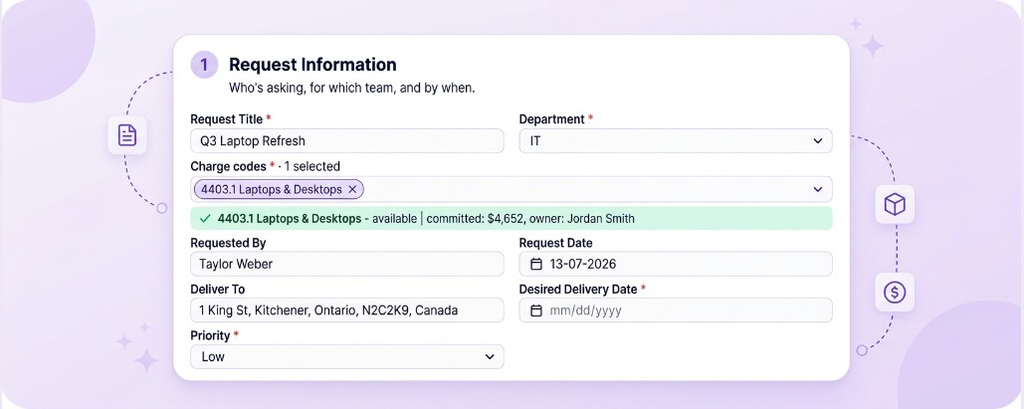
Add Items from Catalog
Products and services come from the company catalog rather than a description somebody has to interpret. Services carry a rate and a unit, so IT setup at eighty five dollars an hour or a quarterly deep clean at three hundred and fifty a visit both produce a priced line straight away.
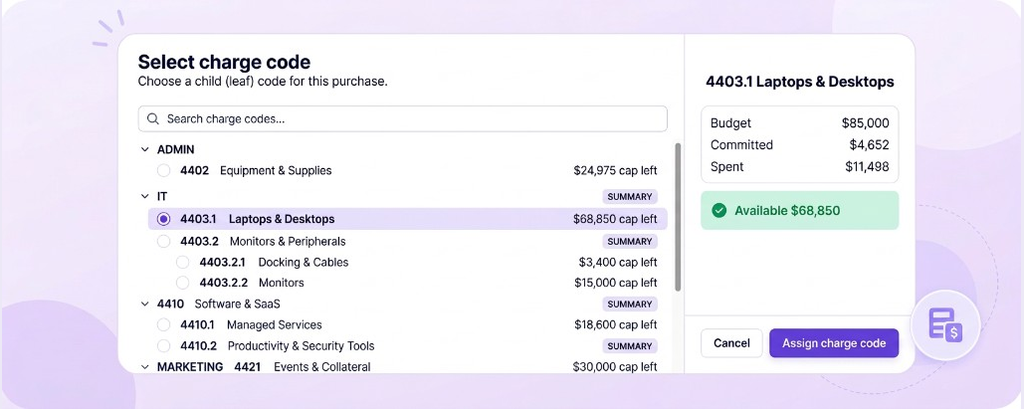
Charge Codes
The requester picks the charge code and sees what is left on it. Charge code 4403 for IT hardware with four thousand seven hundred available tells them right away whether this will sail through or need a word with the budget owner. Splitting across two codes happens here rather than being corrected afterwards. A published budget has to be in place before they can submit.
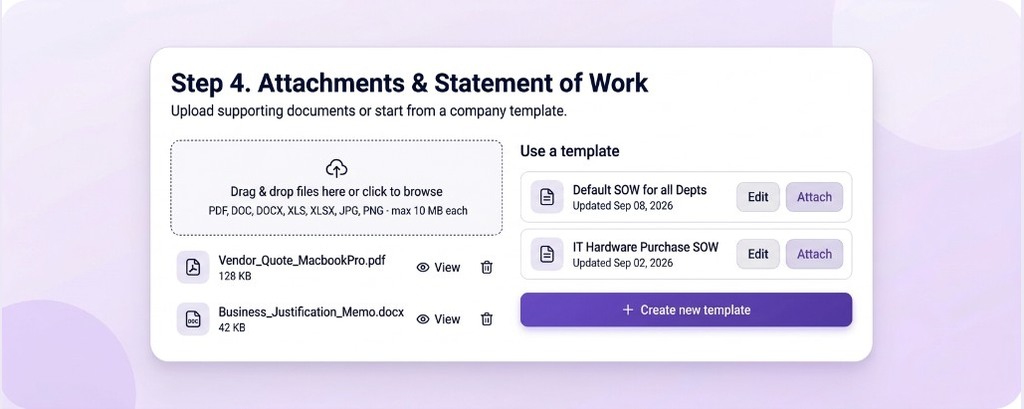
Attachments and SOW
Supporting documents and SOW templates go on the purchase request. When procurement is created, they travel to vendors as the solicitation package. Quotes come back on that event. The purchase order is built after award.
Built from the request, not written again
Everything carries across
Vendor, lines, rates, charge codes, delivery site and required date all move over untouched. There is no second round of data entry, which takes away the most common reason orders go out wrong.
- Catalog lines and rates come across as approved
- Charge code allocation stays on the record. It does not post your ledger
- Delivery site drives the receiving check and the goods receipt
- Request documents and SOW templates travel as the solicitation package
Your budget knows straight away
The moment it is approved, the value sits in committed against the charge code. The purchase order is what the supplier sees. Your ERP still closes the books.
- Committed value lands against the charge code at approval
- Approvers see the real balance before the next decision
- Open commitments are visible for month end. Your ERP still closes the books
- Moving money between charge codes is logged with its approval
Everything downstream hangs off it
The shipment references the order. The receiving check counts against the order lines. The invoice matches the order and the goods receipt. Get the order right and the rest of the chain runs on its own.
- Shipments link to the order and its expected quantities
- Receiving records shipped against received, with condition
- Invoices match order and goods receipt line by line
- Credit notes and replacements attach to the original order
The short version of everyone's job
Procurement gets easier when the boring half moves to the software and the useful half stays with people.
What your team does
Four things, none of which need training or a manual. Most people are through the whole form before their coffee goes cold.
What eProcureAI does
Everything that used to mean chasing somebody, checking something twice, or copying a figure from one screen into another.
One request, several routes out
The request is the same either way. After it is fully approved, most buys go out as procurement for quotes. The purchase order comes from the awarded quote. Catalog items with terms can skip that and go straight to a purchase order.
| Route | When you would use it | What happens after approval | Typical value |
|---|---|---|---|
| RFQ | You know exactly what you want and several suppliers can provide it | Procurement is sent to vendors. Quotes come in. A person awards. Then the PO is built from the quote | $3,000 to $50,000 |
| RFP | You need suppliers to propose an approach, not just a price | Solicitation goes out, scored against your criteria, a person records the award, then the PO is built | $50,000 and up |
| Reverse auction | Commodity spec with at least three suppliers who want the work | Live bidding, suppliers see their rank, a person awards, then the PO is built from the quote | Competitive categories |
| Straight to purchase order | Catalog items from a supplier you already have terms with | No sourcing event. The PO is built from the approved request | Below your competition threshold |
In the product these show up as procurement records with their own numbers. PR-F5B6E4 running as an RFQ, PR-A21C77 as an RFP being evaluated, PR-9DA031 as a reverse auction with bidding live, each still linked back to the request that started it.
Why the catalog does most of the work
Negotiated items, ready to pick
Hardware, peripherals and supplies at the price you negotiated. The requester chooses, the line total appears, and nobody types in a price that is eight months out of date.
Priced by rate and unit
IT setup and configuration at eighty five an hour, installation at sixty, staff training at five hundred a day. Services become proper priced lines instead of a paragraph somebody has to cost up later.
Set once, used everywhere
A rate change is made in one place and every new request picks it up. Requests already approved keep the rate they were approved at, so the history stays honest.
Loading it is quick
Catalogs come in as a spreadsheet, so getting from nothing to a working catalog is an afternoon rather than a project.
Written for humans
Each service carries a plain note about when to use it, like new device rollout or quarterly office clean, so people pick the right one without asking anyone.
Still allowed
Anything not in the catalog goes through as a normal request and gets reviewed. Blocking people is what pushes spend onto personal cards.
Anyone can see who has it right now
Most of the questions procurement teams field are people asking where something got to. These are the states a purchase moves through.
| Status | What it means | Who has it | Usually lasts |
|---|---|---|---|
| Draft | Started but not sent, nothing committed yet | The requester | Minutes |
| Pending approval | Routing rules applied, sitting with a named approver | Whoever is on that step | Hours |
| Exception routing | Over budget or caught by a policy, so somebody decides deliberately | Budget owner or finance | Hours to a day |
| Approved | Spend is committed. Next is procurement for quotes, or a PO if terms are already in place | Buyer, or nobody at all | Immediate |
| Vendor selection | Sourcing event running, quotes or bids coming in | Procurement | Days to weeks |
| Order issued | Purchase order sent to the supplier | The supplier | Until delivery |
| Awaiting check | Shipment has arrived but nobody has counted it yet | The receiving site | Same day |
| Completed | Goods receipt raised, invoice matched, cleared to pay | Accounts payable | Per payment terms |
Questions people actually ask
See it running your own approval rules
Bring your thresholds and a request type you use often. We will put a real one through the four steps with you.
Book your free demoNext in the chain: Receiving and goods receipts