eProcureAI / Platform / AP Automation
AP AutomationInvoices that check
the order before you pay
A vendor bills against the purchase order. You see vendor, lines, due date and match in one list. Clean ones are ready to mark paid. Awkward ones become a dispute the vendor can answer on the record.
This is the real screen. Invoice numbers, vendors, due dates and match, straight from the product.
Your AP team stops typing and starts deciding
Ask an accounts payable team what they do all day and the honest answer is usually retyping things that already exist somewhere else.
An invoice turns up. Somebody keys the vendor, the amount, the lines and the account code, finds the purchase order it belongs to, works out whether the goods actually arrived, and then either pays it or starts an email thread. Multiply that by four hundred a month.
In eProcureAI the vendor raises the invoice against the purchase order. Lines come from the remaining quantity on that order, so nobody is inventing what was bought. Charge codes travel from the purchase request. They do not post your ledger. Your ERP still closes the books.
Then you check three documents against each other
The purchase order says what you agreed to buy. The goods receipt says what actually turned up. The invoice says what you are being asked to pay. All three sit on the same chain, which is the oldest control in accounts payable and still the most effective one.
You mark paid when the three agree. If they do not, you raise a dispute with a reason and files. The vendor is notified, Pay comes off that row, and the conversation stays on the invoice instead of in someone's inbox.
What actually reaches a person
The list, and the calls that need a person. A price that does not match the order. A supplier billing for twenty four units when twenty two arrived. Those land next to the procurement, the due date and the match, so the job is deciding rather than hunting.
AP went from hunting for the order to deciding pay or dispute. The vendor already billed against the PO.Priya N., Controller, distribution, Midwest
Raised against the order, paid when you say so
The vendor bills the PO
They open the purchase order in the portal and submit the invoice against remaining quantity. The format problem people worry about is mostly gone, because the lines already exist on the order.
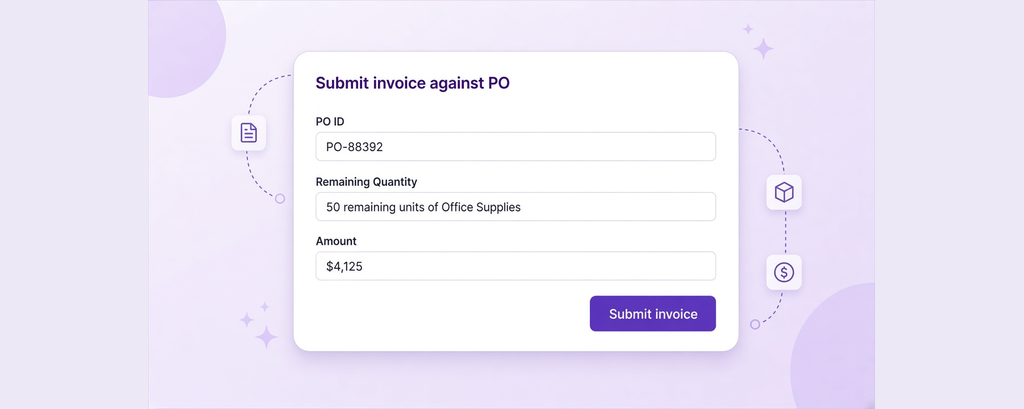
It lands on the AP list
Invoice number, vendor, procurement, amount, due date, match and status in one row. Search finds it. Export writes a CSV when someone still wants a spreadsheet.
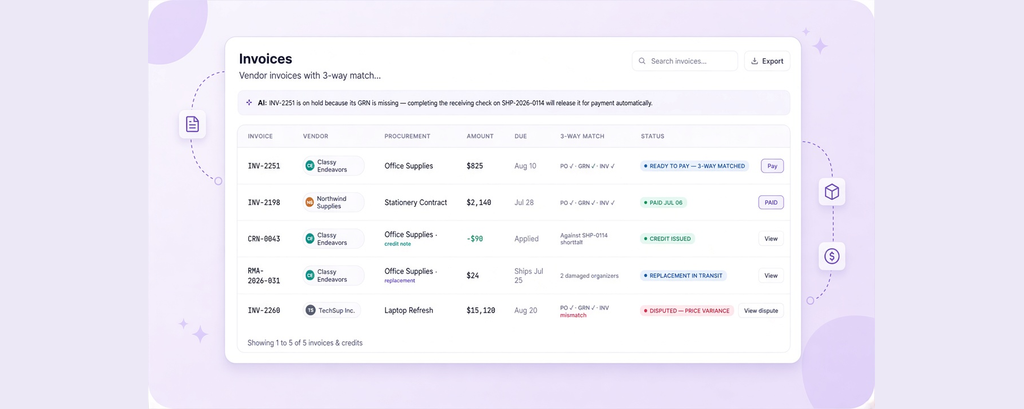
Three documents on one chain
Purchase order, goods receipt and invoice sit together. Receiving counts the shipment and raises the GRN. That is the record you should have before you mark anything paid.
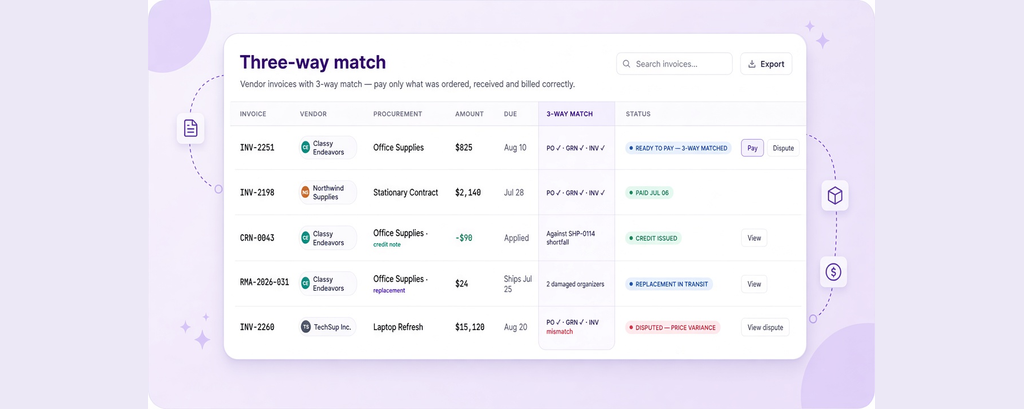
Pay or dispute
Clean invoices are marked paid by your team. Anything that does not line up becomes a dispute with a reason and files. Pay comes off that row until it is resolved.
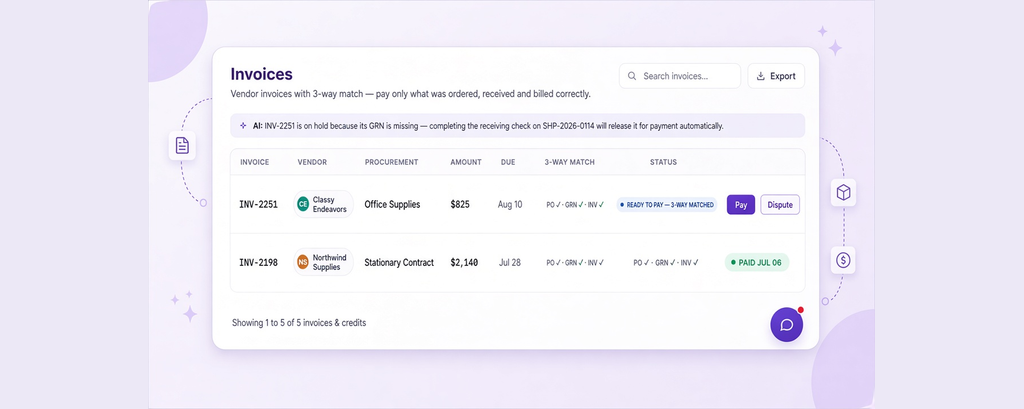
The vendor is told
Marking paid notifies the vendor. A dispute notifies them too, and they can reply on the invoice. While it is unpaid they can send a reminder. Nobody is guessing from an email thread.
Three documents, one honest answer
What each document is for
The order is what you agreed to buy. The receipt is what arrived and what condition it was in. The invoice is what you are being asked to pay. Comparing all three is the control that stops you paying for goods that never turned up.
- Order gives you the agreed price and quantity
- Goods receipt records shipped against received, with condition
- Invoice is checked against both rather than one
- You mark it paid once somebody has counted it
When one of them is missing
INV-2251 is a good example. The order and the invoice agree, but the shipment has arrived and nobody has checked it in yet. The invoice is still on the list. The next move is receiving, not payment. Once the dock raises the goods receipt, you have the third document and can mark it paid with confidence.
- Visible on the AP list while the receipt is missing
- The receiving site counts it and raises the GRN
- You mark paid after the receipt exists
- The chain is on screen rather than in someone's head
When the numbers disagree
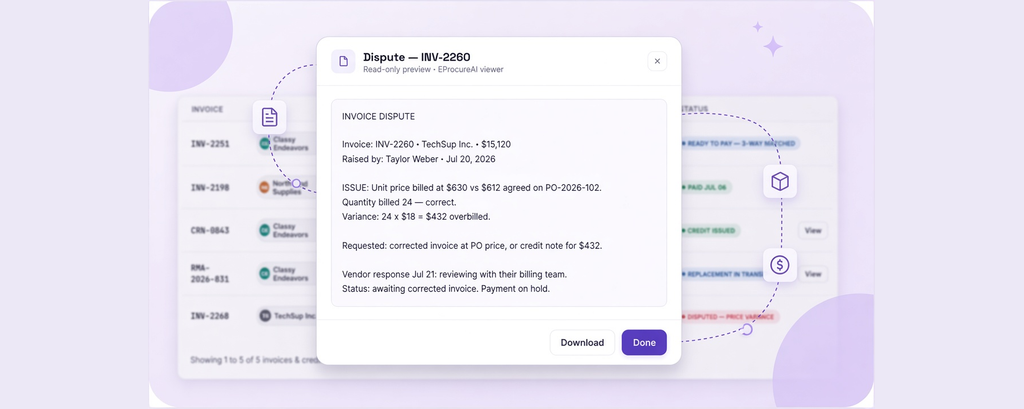
A price that does not match the order goes to dispute rather than payment. Your team writes the reason, attaches files if they have them, and the vendor is notified. Short deliveries and damaged goods are recorded at receiving, where an RMA can ask for a replacement, a credit or a refund, still linked to the original order.
- Price variances raised as disputes with a reason
- Pay comes off the row until the dispute is resolved
- Short and damaged goods recorded at the dock
- Replacements, credits and refunds stay on the order
What the status means and who acts next
These are the records an accounts payable team sees in a week. Between them they cover the clean ones, the missing receipt, the dispute, the credit and the replacement.
| Record | Vendor | Amount | Match position | What happens |
|---|---|---|---|---|
| INV-2198 | Northwind Supplies | $2,140 | Order, receipt and invoice all agree | Ready to mark paid |
| INV-2251 | Classy Endeavors | $825 | Order and invoice agree, receipt not yet raised | Finish receiving, then pay |
| INV-2260 | TechSup Inc. | $15,120 | Order and receipt agree, invoice priced differently | Dispute raised, vendor notified |
| CRN-0043 | Classy Endeavors | Minus $90 | Credit against a short delivery | Shown as a credit note on the list |
| RMA-2026-031 | Classy Endeavors | $24 | Replacement for two damaged organisers | Opened from receiving, tracked to the order |
Credits and replacements stay attached to the order they came from, so what you owe a supplier is visible on the same chain rather than reconstructed later.
The short version of everyone's job
The split matters more than the percentage. Your team keeps the work that needs a person. The software keeps the invoice on the order.
What your team does
Judgement calls on the list. Pay, dispute, or wait for the goods receipt.
What eProcureAI does
Keeps the invoice on the order, tells the vendor, and leaves the decision with you.
What happens when it is not a clean invoice
The vendor bills the order
The clean path is the portal. They pick the purchase order, the remaining lines fill in, and accounts payable is not retyping a PDF.
The goods are not checked in yet
The invoice can still be on the list. Do not mark it paid until receiving has counted the shipment and raised the goods receipt.
Fewer arrived than were billed
The receiving check records the difference. From there you can dispute the invoice or open an RMA for a credit, still linked to the original order.
It arrived broken
Condition is captured during the receiving check. An RMA can request a replacement, a credit or a refund, tracked against the original order.
The invoice does not match the order
Raise a dispute with the reason. Attach files if you have them. The vendor is notified and Pay comes off the row until it is resolved.
The supplier invoices badly
Odd PDFs are why the portal exists. Suppliers who bill against the order come through clean far more often, which fixes the cause rather than the symptom.
Questions people actually ask
Bring a purchase order and a real invoice
We will raise it against the PO, show the match, and run a dispute on the call. That usually settles it faster than anything we could say.
Book your free demoNext in the chain: Budgets and Spend