eProcureAI / Platform / Budgets and Charge Codes
Budgets and Charge CodesBudget Management and Charge Codes for Procurement
Finance plans the year, splits it across departments and down into charge codes. From then on anyone raising a purchase sees exactly what is left before they ask for it.
This is the real screen. Charge codes, balances and reallocation, straight from the product.
The number on screen is the number you can actually spend
Most budget reports tell you what has already been invoiced. That is a picture of the past, and people keep making decisions against it.
eProcureAI keeps every dollar in one of three states. Spent means the invoice has landed. Committed means a purchase order is out with a supplier and the money is promised. Available is what is genuinely left after both.
So when somebody in IT opens a request against charge code 4403, they see four thousand seven hundred available rather than a figure that ignores fifty eight thousand of open orders. They find out before they ask, not three weeks later.
How the money gets there
Finance starts in the company budget planner with the year's total, then splits it across departments, then down into charge codes. A charge code usually mirrors the account structure you already use in your accounting system, so nobody has to learn a second language for the same thing.
After that the codes do the work. They appear on requests, carry through onto purchase orders, and drive both the commitment and the eventual posting.
When plans change
They always do. Moving money between charge codes is a reallocation, and it is a proper action rather than an edit. It records where the money came from, where it went, who approved it and when. That is the difference between a budget that can be trusted and a spreadsheet that quietly changed one Tuesday.
Real time commitment visibility changed how we do quarterly planning. We stopped being surprised by what AP was processing at month end.Daphna Shafran, Head of FP and A, Remilk
How the money finds its way down
The company budget planner
Finance sets the year's total and works out how much each part of the business gets. This is the one moment where the whole picture sits on a single screen.
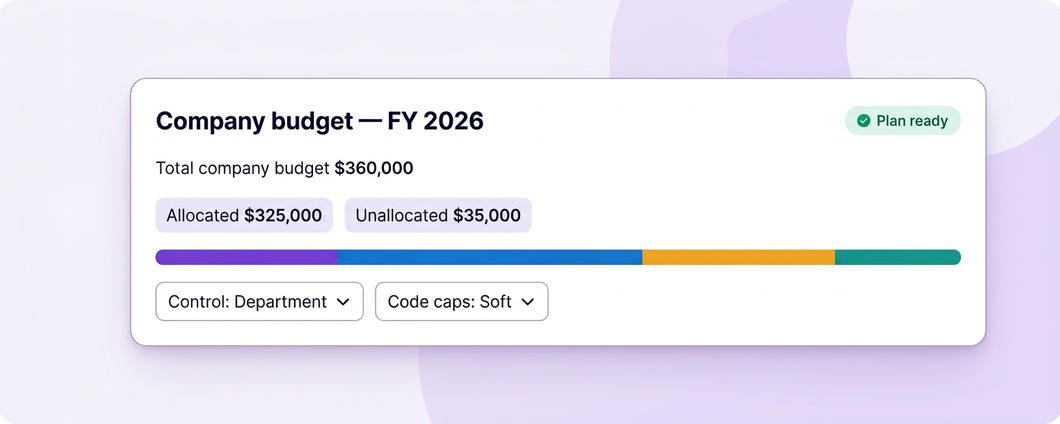
Split across departments
Each department receives its share. Department heads can see their own position from this point on, without seeing everybody else's.
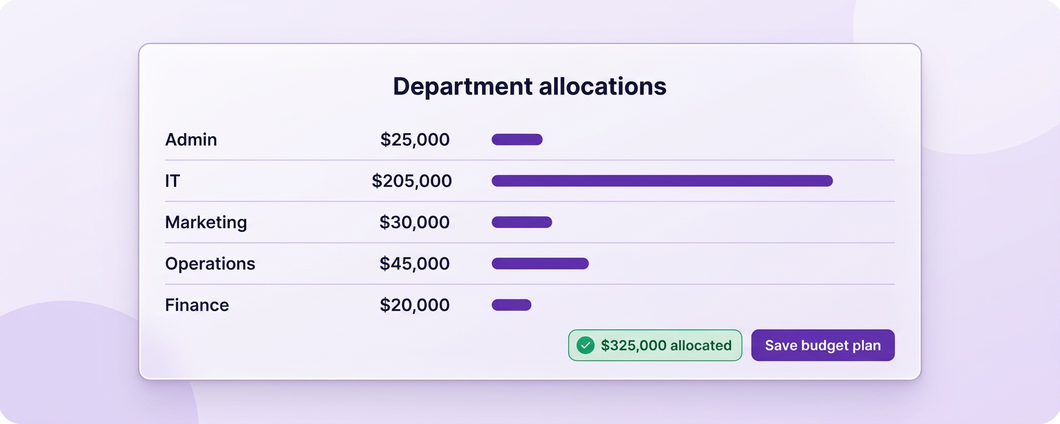
Down into charge codes
Departments break their budget into charge codes, which usually mirror the account codes finance already uses. 4403 for IT hardware, 4404 for software, 4402 for admin.
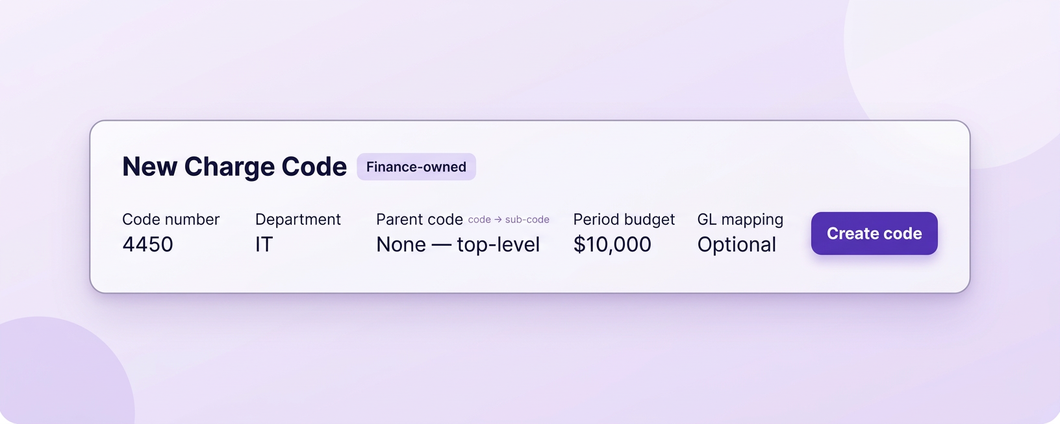
People start spending
Requests carry a charge code, orders commit against it, invoices post to it. The balance updates as each of those happens rather than at the end.
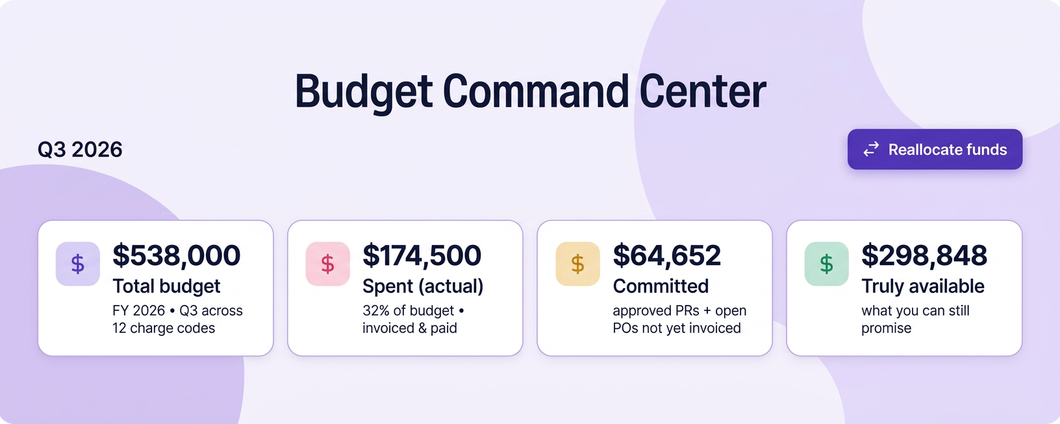
Plans change
Money moves between codes as a recorded reallocation with an approval attached, so the trail explains itself later.
Spent, committed and available
Spent is the easy one
The invoice has arrived, been matched and posted. Every system tracks this, and it is also the least useful number on its own, because by the time it moves the decision was made weeks ago.
- Updates when the invoice posts
- Matched against the order and the goods receipt
- Ties back to the exact purchase that caused it
- The number most budget reports stop at
Committed is the one that changes decisions
A purchase order is out with a supplier. Nothing has been invoiced, but the money is promised and pretending otherwise is how budgets get overspent politely.
- Recorded the moment an order is approved
- Visible to the budget owner immediately
- Included in what a requester sees as remaining
- Turns into spent when the invoice arrives
Available is what people should be looking at
The total minus spent minus committed. It is the only figure that answers the question somebody actually has, which is whether they can buy the thing they need.
- Shown on the request form as people choose a code
- Drives whether a request routes normally or as an exception
- Alerts the budget owner at the threshold you set
- Never includes money that is already promised
Finance owns them, departments spend them
A charge code is the unit everything else hangs off. Getting the structure right at the start saves a lot of reallocation later.
| Charge code | Department | Covers | Typical behaviour when short |
|---|---|---|---|
| 4403 IT Hardware | IT | Laptops, peripherals, equipment refresh | Warn, then exception approval |
| 4404 IT Software | IT | Licences, subscriptions, renewals | Warn, because renewals cannot simply stop |
| 4402 Admin | Admin | Office supplies, stationery, general spend | Warn |
| Capital codes | Any | Anything capitalised rather than expensed | Hard stop, because the classification matters |
| Project codes | Any | Time boxed work with its own funding | Hard stop once the project closes |
Codes are usually set up to mirror the account structure finance already reports on, which keeps the conversation between procurement and accounting short.
What happens when plans change
Between two charge codes
Move available budget from one code to another. It records the source, the destination, the amount, the approver and the date, so the trail explains itself.
More money into a department
When a department genuinely needs more, the increase is recorded against the plan rather than quietly appearing in the balance.
Stop spending on a code
Codes can be closed to new commitments while leaving existing orders alone, which is what you usually want near year end.
Let one request through
Rather than reallocating, a single request can be approved over budget with a reason recorded. Useful when the fix belongs in next quarter's plan.
Tell the owner early
At the threshold you choose, usually ninety percent, the owner hears about it and the alert names the open requests causing the pressure.
End of the year
Open commitments are visible at year end, so the carry forward conversation happens with real numbers rather than estimates.
The short version of everyone's job
Budgets stop being a monthly reporting exercise and become something people check before they act.
What people do
Finance plans, department heads watch their own patch, and requesters simply pick a code from a list.
What eProcureAI does
Keeps the arithmetic current, without anybody exporting anything.
Questions people actually ask
See your own budget structure on screen
Bring your charge codes and we will set them up live, then run a request against one that is nearly empty.
Book your free demoNext in the chain: Spend Analytics